


Vision
An on-device neural network analyzes the live camera feed and marks possible drones in real time. Up to about 50 m in favorable daylight.
 Ward: Drone Detector
Ward analyzes the camera image and ambient sound on your phone. When a possible drone is detected, a direction alert reaches your smartwatch — even while your phone is locked.
For iPhone and Android. Smartwatch notifications are available on supported devices.
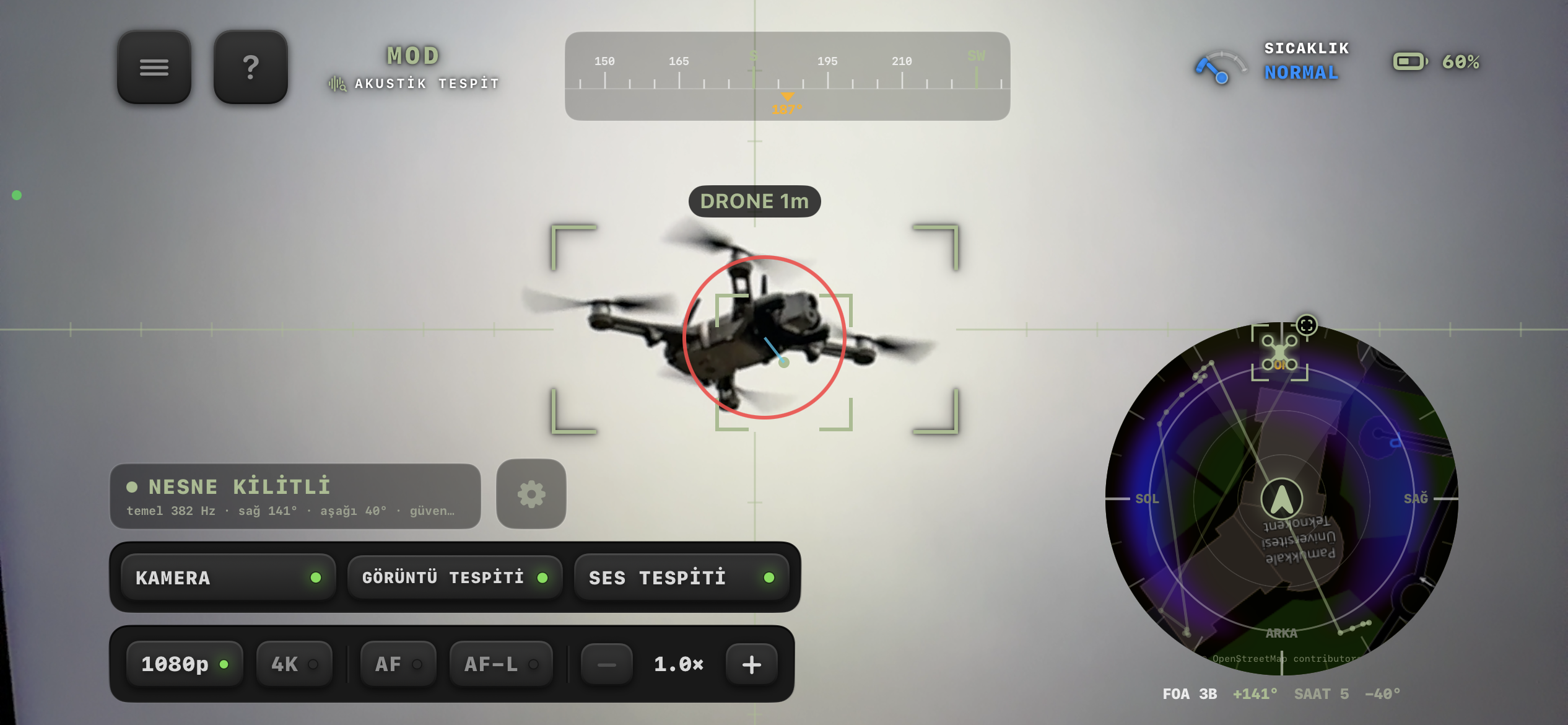
Point the camera at the sky or start acoustic detection. Ward analyzes the image and ambient sound on your phone and marks possible drones on screen. No additional device is required.
Move your pointer across the camera view to look around.
Open Ward and hold your phone toward the area you want to watch.
Use Vision to watch, Acoustic to listen, or Manual to follow something you pick.
Check possible detections and direction estimates as they appear.
Tap anywhere in the camera feed to place a tracking focus. The lock stays exactly where you choose, whether or not an object is present.
Manual tracking, illustrated. Click or tap any point in the sky to place the focus box.
SMARTWATCH
When acoustic detection finds a possible drone, Ward sends an alert to your smartwatch. The live compass keeps showing the estimated direction and heatmap from your wrist.
Instant alert while the iPhone screen is locked
Live bearing on the watch compass
Directional heatmap updates as the estimate moves
Move your pointer over the watch to tilt the 3D view.
Acoustic mode listens for rotor and motor signatures, then estimates their direction in real time. Directional processing is enhanced on iPhone 16 and later.
Up to about 70 m in quiet, open environments.
Acoustic mode, illustrated. Drag to rotate the view.
Map view, illustrated. Drag to rotate the map.
Recent acoustic estimates build a heatmap around your position, making the likely direction easy to read at a glance.
Direction and position are estimates, not a verified GPS location.
Each mode approaches detection differently, so you can pick the one that fits the conditions.
An on-device neural network analyzes the live camera feed and marks possible drones in real time. Up to about 50 m in favorable daylight.
Select a region on the camera feed and Ward follows it, even when the detection model doesn't recognize the object.
Ward can flag a non-drone object or miss a real drone. Treat the ranges below as approximate guidance, not a guaranteed detection boundary.
Vision
Daytime, favorable conditions
Acoustic
Quiet, open environment
Map direction and position indicators are estimates. They don't represent a drone's verified GPS position, exact location or exact distance.
No. Ward only analyzes images from your phone's camera and sound from its microphone. It doesn't transmit signals or interfere with drones.
No. Ward is not radar, a certified security system or an emergency warning device. Detection results are probabilistic, so false detections can happen and a drone may go undetected.
Under favorable daytime conditions, visual detection is designed for distances up to about 50 meters. Acoustic detection may work up to about 70 meters in quiet, open environments. These are approximate reference values, not guaranteed ranges.
No. Map direction and position indicators are estimates. They don't represent a drone's verified GPS position, exact location or exact distance.
Directional audio processing is enhanced on iPhone 16 and later. Other supported devices operate in stereo.
Ward requires an active subscription. After downloading, choose a monthly or yearly plan. Subscriptions renew automatically unless you cancel them in your App Store or Google Play subscription settings.
Use Ward only in safe and lawful settings, and comply with applicable local laws.
For iPhone and Android, with smartwatch alerts on supported devices. Choose a monthly or yearly subscription in the app.